Luckyy 
Administrator

Staff





LEVEL 500
XP
Manual
- Download a release from the Releases page.
- Create a ~/.var/app/com.valvesoftware.Steam/data/Steam/compatibilitytools.d/ directory if it does not exist.
- Extract the release tarball into ~/.var/app/com.valvesoftware.Steam/data/Steam/compatibilitytools.d/.
- tar -xf GE-ProtonVERSION.tar.gz -C ~/.var/app/com.valvesoftware.Steam/data/Steam/compatibilitytools.d/
- Restart Steam.
- Enable proton-ge-custom
Enabling
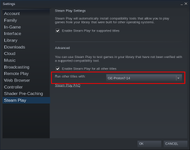
- Right click any game in Steam and click Properties.
- At the bottom of the General tab, Check Force the use of a specific Steam Play compatibility tool, then select the desired Proton version.
- Launch the game.
Last edited by a moderator: